It listens to the first three seconds of an answered call, turns the speech into text on your own PC, and decides who picked up.
That is the whole idea. Below is the setup, in three steps, and the five numbers you may want to change.
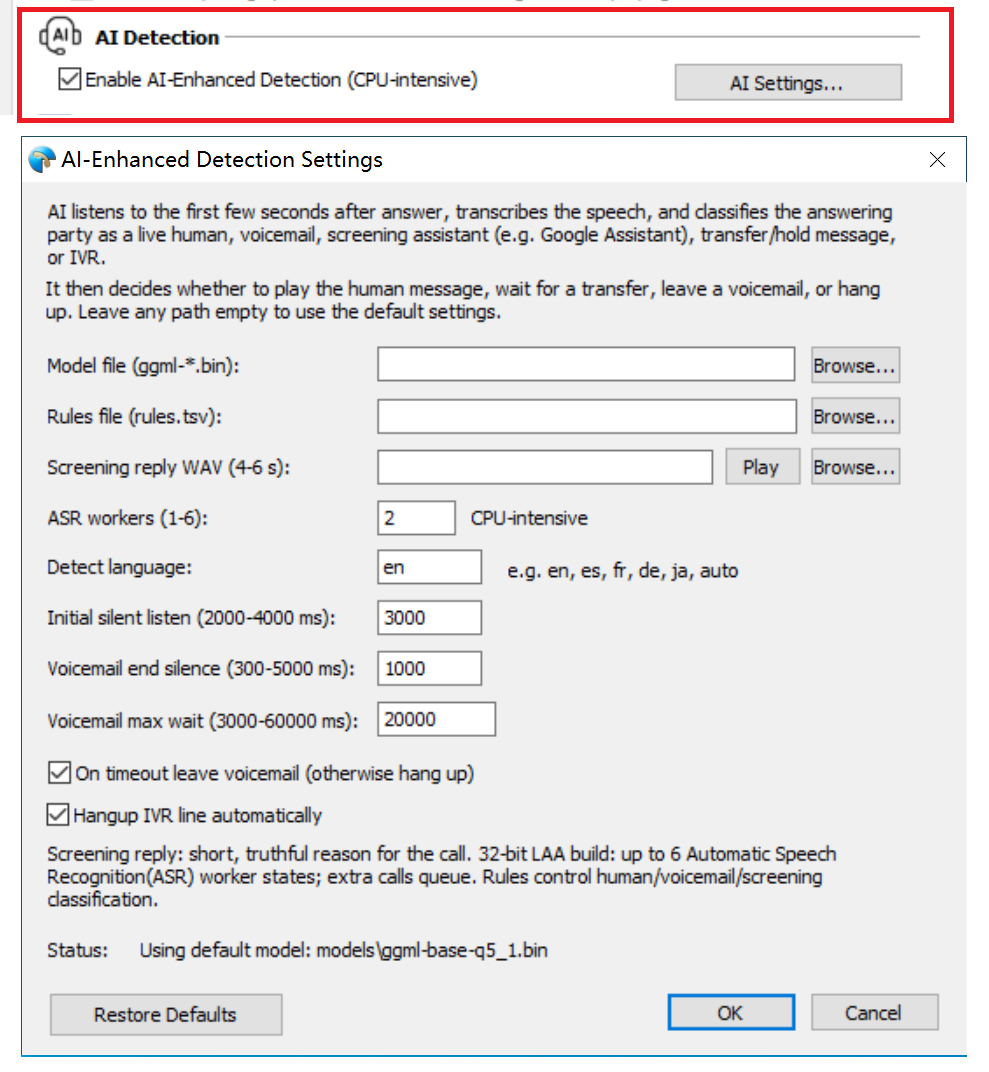
Open Tools > Options > Voice Activity Detection and tick Enable AI-Enhanced Detection.
That is the entire default setup. A speech model ships inside the installer, so you can leave the model and rules fields empty.
Most dialers sort answers into two buckets: a person or a machine. This sorts five.
| What answered | What happens next |
|---|---|
| A person | The agent is connected |
| Voicemail | It waits for the greeting, leaves your message, hangs up |
| Screening assistant | It plays a short reply, then waits |
| Transfer or hold message | It waits for the transfer |
| Phone menu | It hangs up, if you leave that setting on |
The fourth row is the one people notice. “Please hold while I transfer you” used to sound like a machine, so the dialer dropped a warm call. Now it waits.
Why the old method struggled with rows three and four: this explains it in twelve questions.
Dial 50 numbers you can identify in advance: 20 that a person will answer, 20 that go to voicemail, 10 with a menu.
Write down four counts. People connected. Voicemails caught. Voicemails missed. People wrongly dropped.
Read the last one first. If it hangs up on real people, nothing else on the list matters.
Two fixes cover most of it. Dropping real people? Raise Initial silent listen to 4000 ms. Missing voicemails? Raise Voicemail max wait past 20 seconds.
The five numbers
| Setting | Default | What it does |
|---|---|---|
| Detect language | en | Name the language you are calling. auto works, but it checks several languages on every call and costs extra CPU. |
| Initial silent listen | 3000 ms | How long it listens before your agent speaks |
| Voicemail end silence | 1000 ms | How much silence means the greeting finished |
| Voicemail max wait | 20000 ms | The longest greeting it will sit through |
| ASR workers | 2 | How many calls it can read at the same time |
Two checkboxes sit underneath. On timeout leave voicemail decides what happens when it cannot tell: leave a message or hang up. Hangup IVR line automatically ends calls that land in a phone menu. Both are on by default, and both are right for outbound sales.
One more field worth knowing: Screening reply WAV. Google’s call screening asks who is calling and why, and this is the four-to-six-second recording it hears. Keep it honest and keep it short.
What it cannot do
- It waits about three seconds. It cannot read speech it has not heard yet.
- One-word answers are hard. A bare “Hello?” gives it very little to work with.
- Phone audio is narrow. 8 kHz and compressed, which limits every model.
- Accents and rare languages are weaker, especially with the small default model.
- It cannot fix a bad list. Wrong numbers stay wrong.
It also uses CPU, and the checkbox says so. Each worker reads one call at a time, so two workers on five lines means three calls wait their turn. Start at two, raise it by two, and watch the task manager during your busiest hour rather than a quiet morning.
If calls queue at peak, add workers or dial fewer lines. No setting makes a slow machine fast.
The feature is in both editions. If you already run Ecsow it is one checkbox away, and the trial dials 20 contacts per campaign if you want to test it first. Licences start at $10 a month for one line.
Quick answers
Does it send my audio anywhere?
No. The speech model runs on the machine running Ecsow. Nothing is uploaded, and there is no per-minute charge.
How many calls can it read at once?
The worker setting goes from 1 to 6 in the 32-bit build. Each worker handles one call, and extra calls queue briefly. Start at two.
Does it work in other languages?
Yes. Set the language you are calling, such as en, es or fr. Naming it is faster and more accurate than letting the software guess. The auto option works, but it costs extra CPU.
Which editions have it?
Both Ecsow Auto Dialer and Ecsow Voice Broadcast. Same checkbox, same settings panel.